

How Much Does Accounting Software Cost in 2025?
 372
372

Start by listing the tools and user accounts you need today. Compare the regular subscription price with any introductory offer, then check the cost of additional services. A trial is useful for testing your daily workflow before choosing a plan. Review billing terms directly with the provider and allow room for your business to grow.
Start by listing the tools and user accounts you need today. Compare the regular subscription price with any introductory offer, then check the cost of additional services. A trial is useful for testing your daily workflow before choosing a plan.
How Much Does Accounting Software Cost?
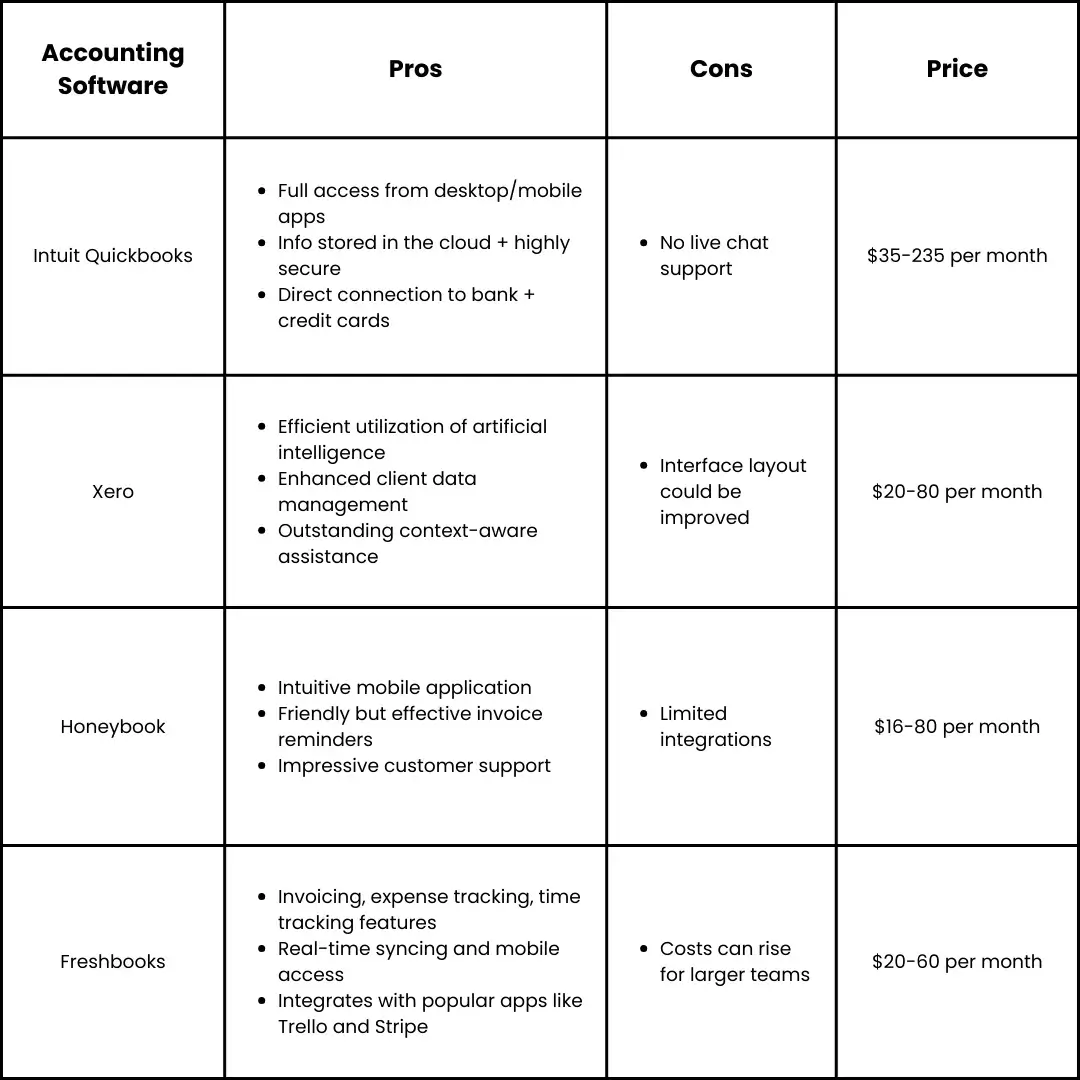
Accounting software costs can vary widely depending on the features and level of support you need. For example, Intuit QuickBooks starts at $35/month for its starter plan, offering essentials like bookkeeping and invoicing, while its advanced plan costs $235/month and includes tools like inventory management and project profitability. Xero, another popular choice, starts at $20/month for basic functionality like invoicing and bank reconciliation, with advanced plans at $80/month, which add multi-currency support and advanced analytics.
For those in creative industries or project-based businesses, HoneyBook offers a starter plan for $16/month, with its premium plan priced at $66/month, providing additional tools for team collaboration and client management. Similarly, FreshBooks caters to a wide range of users, starting at $20/month and going up to $60/month for premium plans, with custom pricing available for businesses needing tailored solutions.
Start by listing the tools and user accounts you need today. Compare the regular subscription price with any introductory offer, then check the cost of additional services. A trial is useful for testing your daily workflow before choosing a plan.
How Does Accounting Software Pricing Work?
Accounting software pricing models generally fall into three main categories: one-time licenses, subscription-based pricing, and usage-based pricing. Each model has its pros and cons, depending on your business size, needs, and budget.
- One-time licensesStart by listing the tools and user accounts you need today. Compare the regular subscription price with any introductory offer, then check the cost of additional services. A trial is useful for testing your daily workflow before choosing a plan.
- Subscription-based pricing: Common with cloud-based solutions like Xero and QuickBooksStart by listing the tools and user accounts you need today. Compare the regular subscription price with any introductory offer, then check the cost of additional services.Xero's starter plan costs $20/month, while QuickBooks starts at $35/month, with higher tiers offering expanded features and support.
- Usage-based pricingStart by listing the tools and user accounts you need today. Compare the regular subscription price with any introductory offer, then check the cost of additional services. A trial is useful for testing your daily workflow before choosing a plan.
What’s Included vs. Hidden Costs
While advertised prices often highlight core functionality, the total cost of ownership (TCO) includes additional expenses that aren’t always immediately evident. For example:
- Setup fees: Costs for initial configuration and customization.
- Data migration: Transferring existing records into the new system can be costly, particularly for complex data sets.
- Support and training: Premium support options, such as 24/7 assistance or dedicated account managers, often come with additional fees.
- Hidden contract fees: Cancellation penalties, transaction fees, and charges for exceeding data or user limits may be buried in the terms and conditions.
Factors That Influence Accounting Software Pricing
When evaluating accounting software, businesses must look beyond the sticker price to understand the key drivers behind the cost. Here are the main factors that influence pricing:
- Software features and complexityStart by listing the tools and user accounts you need today. Compare the regular subscription price with any introductory offer, then check the cost of additional services. A trial is useful for testing your daily workflow before choosing a plan.
- Deployment typeStart by listing the tools and user accounts you need today. Compare the regular subscription price with any introductory offer, then check the cost of additional services.
- Customization and scalabilityStart by listing the tools and user accounts you need today. Compare the regular subscription price with any introductory offer, then check the cost of additional services. A trial is useful for testing your daily workflow before choosing a plan.
- Integration capabilities: Software that integrates seamlessly with other business systems like ERP, inventory management, or CRM often costs more due to the added functionality and efficiency it provides.
- Support and maintenance: Built-in support and maintenance services elevate prices but can save costs in the long run, particularly for cloud-based solutions that require less maintenance compared to on-premises software.
By understanding these factors, businesses can choose accounting software that aligns with their operational requirements and budget, ensuring a strong return on investment.
Conclusion
Start by listing the tools and user accounts you need today. Compare the regular subscription price with any introductory offer, then check the cost of additional services. A trial is useful for testing your daily workflow before choosing a plan.
Start by listing the tools and user accounts you need today. Compare the regular subscription price with any introductory offer, then check the cost of additional services. A trial is useful for testing your daily workflow before choosing a plan.
Start by listing the tools and user accounts you need today. Compare the regular subscription price with any introductory offer, then check the cost of additional services. A trial is useful for testing your daily workflow before choosing a plan. Review billing terms directly with the provider and allow room for your business to grow.
Liked this article?
 Related Articles


Smart Recommendations