
Best Accounting Software For Small Business: QuickBooks vs FreshBooks

Gabriel Nwatarali
 240
240
A clear view of your accounts starts with a workflow that fits your business. Bring invoices, expenses and financial reports together, then review the details that matter to your team. Compare the available tools, try the everyday tasks yourself and choose a setup you can maintain as your business grows. A clear view of your accounts starts with a workflow that fits your business.
There are two names that typically come to mind when we think of accounting software. These are QuickBooks and FreshBooks. They’re the top players in the industry of cloud-based accounting solutions. We’ll be focusing on them for our accounting software comparison.
A clear view of your accounts starts with a workflow that fits your business. Bring invoices, expenses and financial reports together, then review the details that matter to your team. Compare the available tools, try the everyday tasks yourself and choose a setup you can maintain as your business grows.
A clear view of your accounts starts with a workflow that fits your business. Bring invoices, expenses and financial reports together, then review the details that matter to your team. Compare the available tools, try the everyday tasks yourself and choose a setup you can maintain as your business grows.
Usability or ease of use
Consider how your team will learn the software and get help when questions arise. Explore the help centre, check the support channels and look for examples relevant to your business. An effective onboarding process should make everyday tasks clear and give you a reliable way to solve problems as your needs change.
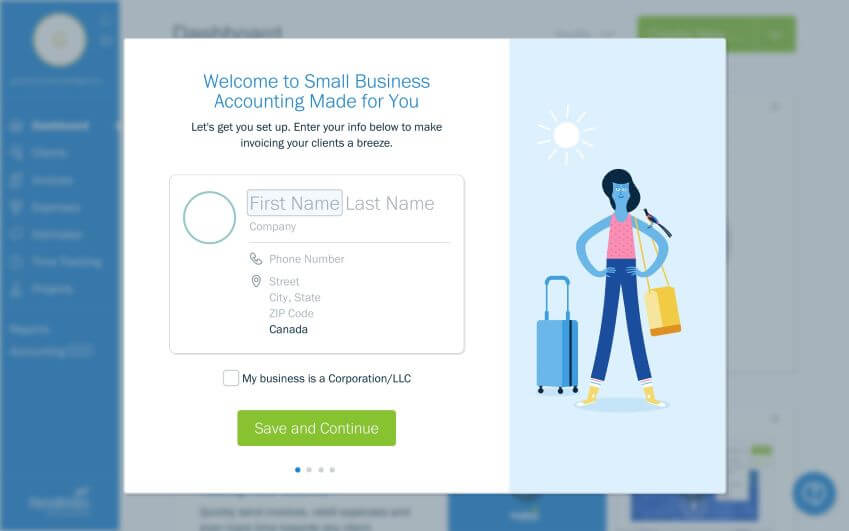
FreshBooks has a fantastic guide that activates the moment you sign up for an account and verify your email address. The simplified walkthrough helps you fill out your business and industry details.
Consider how your team will learn the software and get help when questions arise. Explore the help centre, check the support channels and look for examples relevant to your business. An effective onboarding process should make everyday tasks clear and give you a reliable way to solve problems as your needs change.
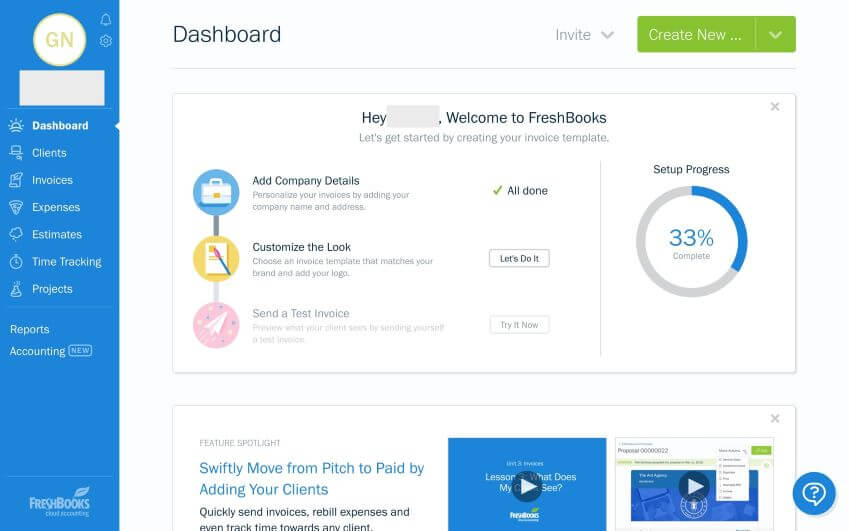
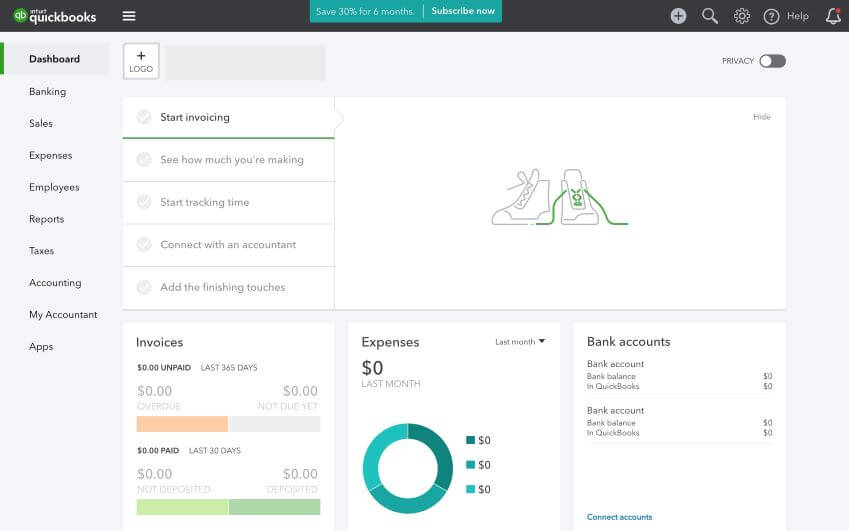
QuickBooks also has a user-friendly interface and a guide that immediately shows up once you’ve registered. Surprisingly, you don’t have to verify your email address to start using the software.
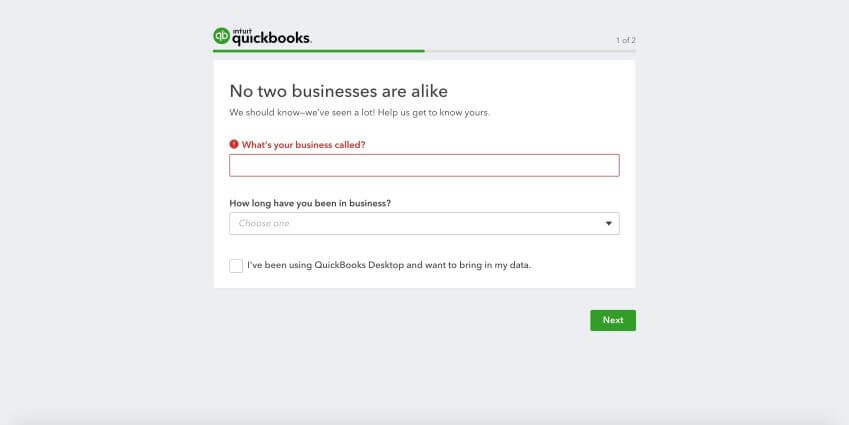
Consider how your team will learn the software and get help when questions arise. Explore the help centre, check the support channels and look for examples relevant to your business.
Invoicing
A clear view of your accounts starts with a workflow that fits your business. Bring invoices, expenses and financial reports together, then review the details that matter to your team. Compare the available tools, try the everyday tasks yourself and choose a setup you can maintain as your business grows.
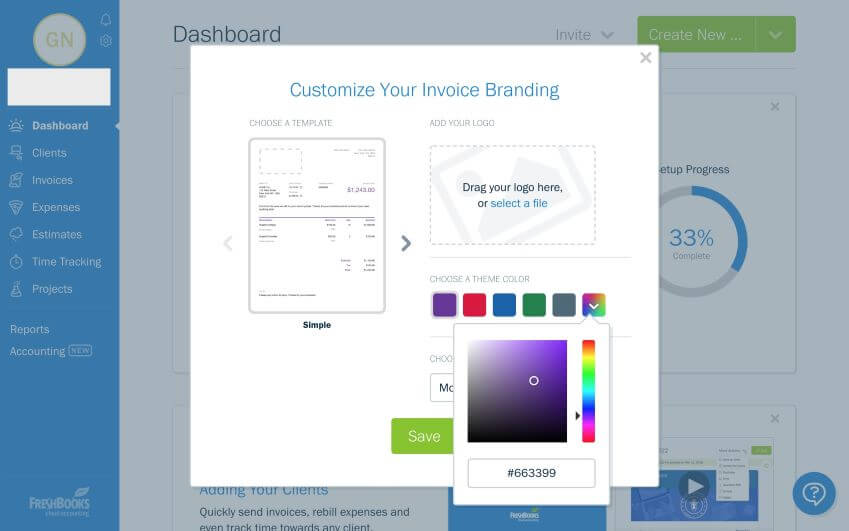
Also, FreshBooks makes it super-easy to automate recurring billing for monthly subscriptions or services. Customers can register a credit card with their file so that payments can be automatically withdrawn.
A clear view of your accounts starts with a workflow that fits your business. Bring invoices, expenses and financial reports together, then review the details that matter to your team.
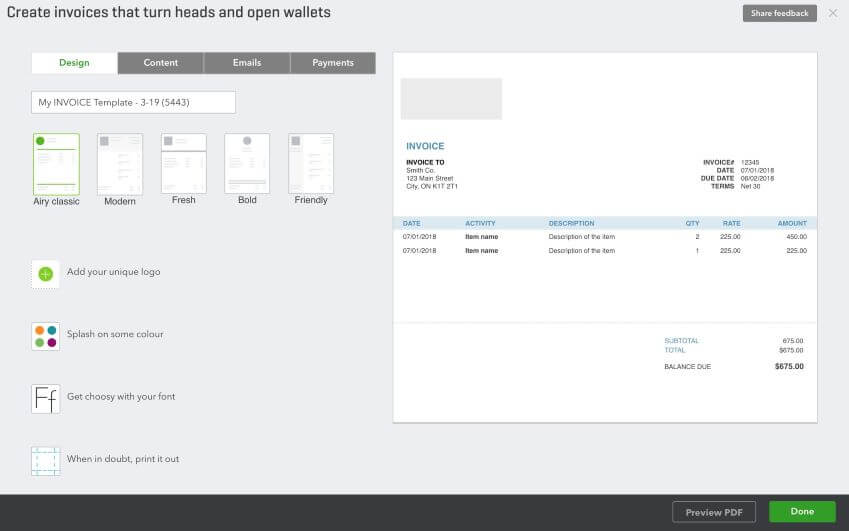
A clear view of your accounts starts with a workflow that fits your business. Bring invoices, expenses and financial reports together, then review the details that matter to your team. Compare the available tools, try the everyday tasks yourself and choose a setup you can maintain as your business grows.
A clear view of your accounts starts with a workflow that fits your business. Bring invoices, expenses and financial reports together, then review the details that matter to your team. Compare the available tools, try the everyday tasks yourself and choose a setup you can maintain as your business grows.
A clear view of your accounts starts with a workflow that fits your business. Bring invoices, expenses and financial reports together, then review the details that matter to your team.
Bill payment and expenses
Both platforms allow you to process bill payments with reoccurring support, which is important for any growing business.
A clear view of your accounts starts with a workflow that fits your business. Bring invoices, expenses and financial reports together, then review the details that matter to your team. Compare the available tools, try the everyday tasks yourself and choose a setup you can maintain as your business grows.
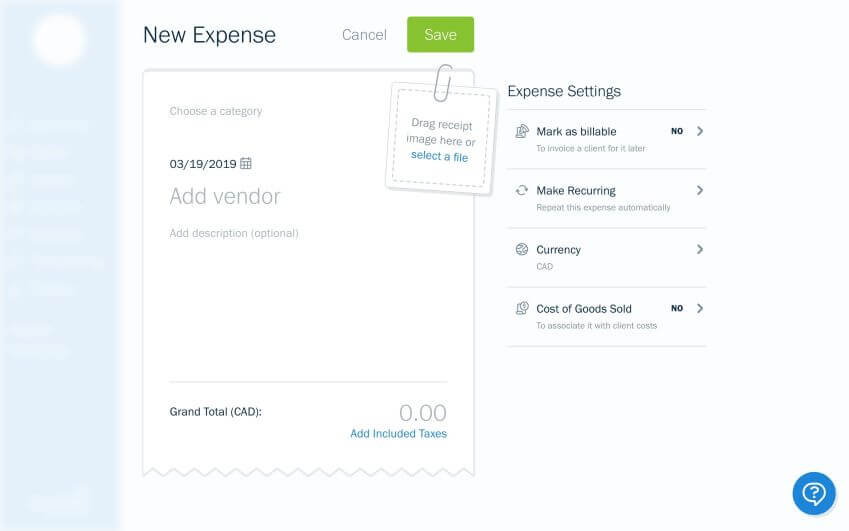
A clear view of your accounts starts with a workflow that fits your business. Bring invoices, expenses and financial reports together, then review the details that matter to your team. Compare the available tools, try the everyday tasks yourself and choose a setup you can maintain as your business grows.
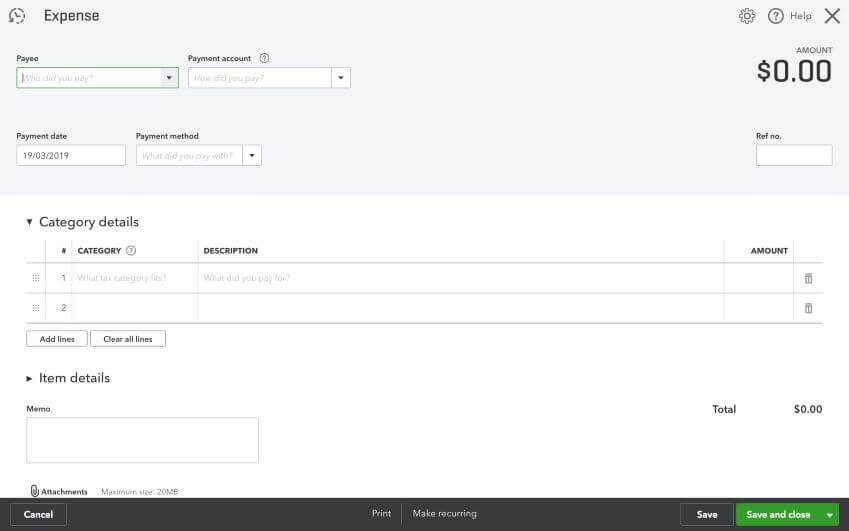
A clear view of your accounts starts with a workflow that fits your business. Bring invoices, expenses and financial reports together, then review the details that matter to your team. Compare the available tools, try the everyday tasks yourself and choose a setup you can maintain as your business grows.
Pricing and packages
Start by listing the tools and user accounts you need today. Compare the regular subscription price with any introductory offer, then check the cost of additional services. A trial is useful for testing your daily workflow before choosing a plan.
Start by listing the tools and user accounts you need today. Compare the regular subscription price with any introductory offer, then check the cost of additional services. A trial is useful for testing your daily workflow before choosing a plan. Review billing terms directly with the provider and allow room for your business to grow.
Companies that process more than 150K in transactions per year or have more than 500 clients can sign up for FreshBooks Select. Investment varies based on the business.
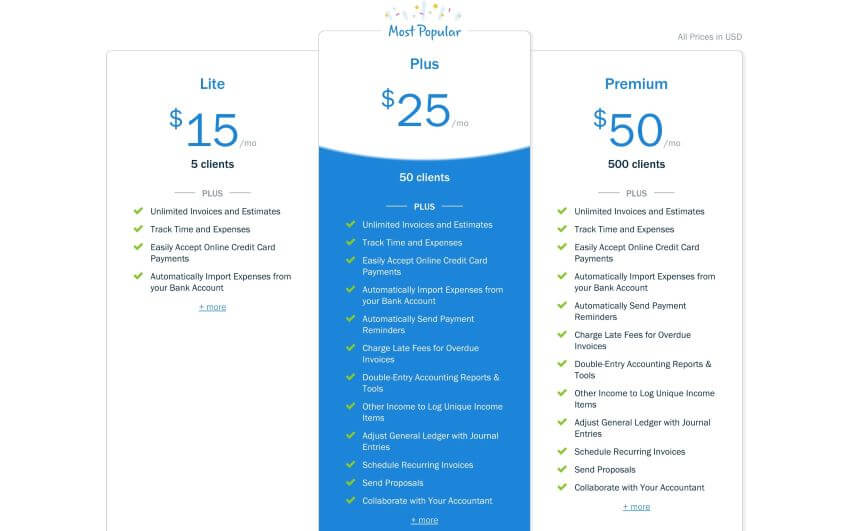
The Lite or Plus plan is perfect for businesses who are just starting out. But established companies looking to buy/switch accounting software for small business will need a Premium or higher plan.
QuickBooks plans come with much of the same features but there are more limitations. For example, you won’t be able to pay bills with their basic plan unless you upgrade. Plus you’re limited to one user/employee.
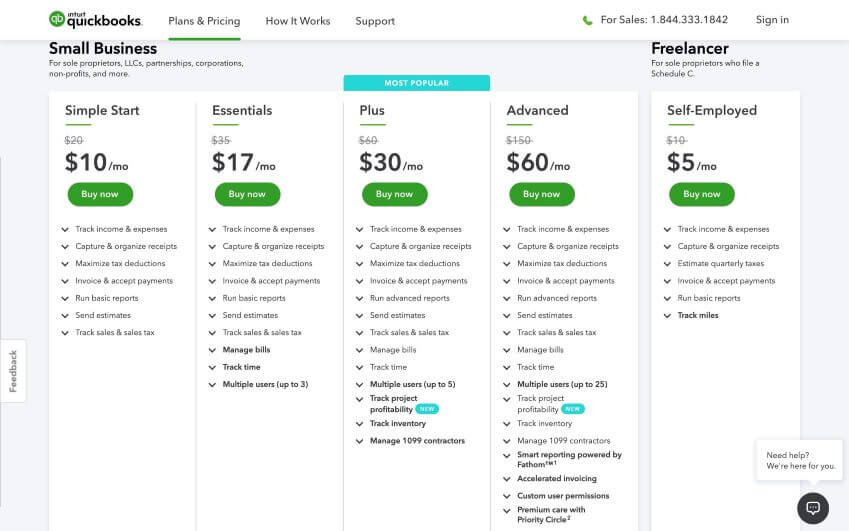
Start by listing the tools and user accounts you need today. Compare the regular subscription price with any introductory offer, then check the cost of additional services. A trial is useful for testing your daily workflow before choosing a plan.
Start by listing the tools and user accounts you need today. Compare the regular subscription price with any introductory offer, then check the cost of additional services. A trial is useful for testing your daily workflow before choosing a plan. Review billing terms directly with the provider and allow room for your business to grow.
Reporting
Every business needs accurate reporting to effectively grow. Good accounting software goes beyond inputting and outputting data. They provide means to analyze and identify growth opportunities.
A clear view of your accounts starts with a workflow that fits your business. Bring invoices, expenses and financial reports together, then review the details that matter to your team. Compare the available tools, try the everyday tasks yourself and choose a setup you can maintain as your business grows.
A clear view of your accounts starts with a workflow that fits your business. Bring invoices, expenses and financial reports together, then review the details that matter to your team. Compare the available tools, try the everyday tasks yourself and choose a setup you can maintain as your business grows.
A clear view of your accounts starts with a workflow that fits your business. Bring invoices, expenses and financial reports together, then review the details that matter to your team. Compare the available tools, try the everyday tasks yourself and choose a setup you can maintain as your business grows.
Integrations
Connected tools can reduce repeated work across your business. Before enabling a connection, review which records it shares, how often information updates and who can access it. Test the connection with a small set of sample records.
QuickBooks has a wider selection of app integrations and supports most of the same applications as its counterpart. However, FreshBooks integrations will suffice for the majority of small business.
Customer service and support
Access to support is easy to find for both organizations. QuickBooks permanently has a link on the top right corner of its dashboard. FreshBooks makes it a bit simpler to access from the bottom right of its dashboard.
Overall, both have support documents such as FAQ (frequently asked questions) or guides, and they can be reached by phone, including email. QuickBooks has live chat, which isn’t available with FreshBooks.
Security
A clear view of your accounts starts with a workflow that fits your business. Bring invoices, expenses and financial reports together, then review the details that matter to your team. Compare the available tools, try the everyday tasks yourself and choose a setup you can maintain as your business grows.
Concluding our accounting software comparison
A clear view of your accounts starts with a workflow that fits your business. Bring invoices, expenses and financial reports together, then review the details that matter to your team.
Liked this article?
Gabriel Nwatarali
Smart Recommendations